
[PROJECT] Automatic File Management — Organize, Automate with Python Scripting

![[PROJECT] Automatic File Management — Organize, Automate with Python Scripting](/assets/images/PRJ-automatic-file-management/cover_automatic-file-management.png)
Python can be an amazing tool for automating simple, repetitive tasks on your computer with minimal effort. One tidious task i often face is keeping my downloads folder organized. Over time, it can become cluttered with various file types, making it difficult to find what I need quickly.
In this project, I developed a Python script that automatically organizes files in my downloads folder into subfolders based on their file types. This not only helps keep my workspace tidy but also saves me time and effort in managing my files.
Features of the Automatic File Management Script
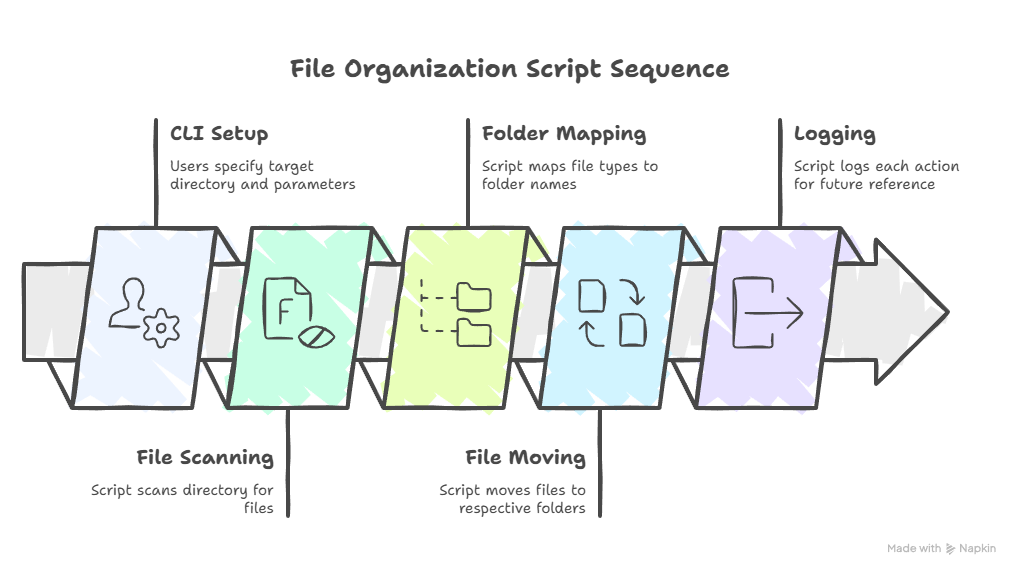
- File Type Detection: The script identifies files based on their extensions (e.g., .pdf, .jpg, .docx) and categorizes them accordingly.
- Dynamic Folder Creation: If a folder for a specific file type does not exist, the script creates it automatically.
- Scheduled Execution: The script can be set to run at regular intervals using task schedulers (like cron on Linux or Task Scheduler on Windows).
- Logging: It maintains a log of moved files for easy tracking and debugging.
How it Works
Example Code Snippet
To view the complete code and detailed instructions on how to set up and run the script on your own, check out the GitHub repository
Potential Enhancements
- Customizable Rules: Allow users to define their own rules for file organization.
- OCR Integration: Implement OCR to categorize files based on their content rather than just file type.
- User Interface: Develop a simple GUI to make it easier for non-technical users
Conclusion
I enjoyed the fact to solve a common problem with a simple Python script. This project showcases how programming can be used to automate everyday tasks, making life a bit easier and still be able to improve this further with more features in the future.
Automatic file management is just one example of how Python can be leveraged for productivity and organization. Please feel free to explore the code, contribute, or suggest improvements!
Explore more like this
![[PROJECT] Create a static Website based on a resume using Langflow](/assets/images/PRJ-langflow-resume-website/cover-langflow.png)
[PROJECT] Create a static Website based on a resume using Langflow
Langflow is a Low-code AI builder for agentic and RAG applications. It is a powerful tool to build and deploy AI agents and MCP servers. It supports all major LLMs,...
![[PROJECT] Local HEIC-JPEG Converter](/assets/images/PRJ-heic-converter/cover_heic_converter.png)
[PROJECT] Local HEIC-JPEG Converter
Windows users often face compatibility issues, as many applications do not support HEIC files natively. To address this, I developed a simple local HEIC to JPEG converter using Python.
![[PROJECT] Building a Free Automated Movie and TV Show Tracking System](/assets/images/PRJ-movie-tracker-automation/cover-movie-tracker-automation-removebg-preview.png)
[PROJECT] Building a Free Automated Movie and TV Show Tracking System
This project covers the process of creating an automated system to track your movie and TV show collection using Python and free Hosting services. This system helps keep an organized...
Comments