
[PROJECT] Building a Free Automated Movie and TV Show Tracking System

![[PROJECT] Building a Free Automated Movie and TV Show Tracking System](/assets/images/PRJ-movie-tracker-automation/cover-movie-tracker-automation-removebg-preview.png)
This project covers the process of creating an automated system to track your movie and TV show collection using Python and free Hosting services. This system helps keep an organized record of your media library without relying on paid services.
Overview
The system consists of the following components:
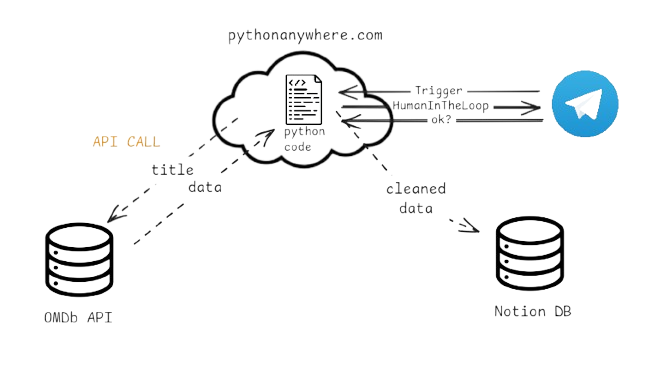
- Data Source: A reliable source for movie and TV show data to populate my tracker. For example the Open Movie Database (OMDb) API which provides comprehensive information about movies and TV shows.
- Database: For example Notion, a versatile, free note-taking and database application usable across multiple devices.
- Automation: Python scripts to fetch data from the OMDb API and update my Notion database automatically.
- Hosting: Python Scripts can be hosted on PythonAnywhere, a free hosting service. Limitations apply, but it works well for my needs.
- Webhook: For example a Telegram bot to trigger the automation process whenever you want to update your tracker. A message to the bot triggers the script, Human-in-the-loop for error handling, and updates the Notion database.
My Decision-Making Process
Choosing Notion for Database
I watched a YouTube video about using Notion for tracking movies and TV shows. So i started to copy the database structure into my own Notion workspace. However, I quickly realized that manually entering data for each movie and TV show would be tedious and time-consuming.
Selecting OMDb API
To automate the process, I researched various APIs and found the OMDb API to be a suitable choice due to its comprehensive data and ease of use. I then wrote Python scripts to fetch data from the API and update my Notion database.
Hosting on PythonAnywhere
To host the scripts, I explored different options and settled on PythonAnywhere due to its free tier and ease of use. Render and Heroku were also considered, but they seem to no longer offer free plans or only with significant limitations.
Using Telegram Bot for Webhook
Finally, I set up a Telegram bot to trigger the automation process. This allows me to update my tracker whenever I want by simply sending a message to the bot. Telegram’s Bot API is straightforward to use and integrates well with Python. WhatsApp Business API seemed more complex to set up and the need to share even more data to Meta was a concern for me.
Difficulties Encountered
During the implementation, I faced several challenges:
- API Limitations: The OMDb API has usage limits on the free tier, which required me to optimize my requests and handle rate limiting gracefully.
- Notion API Complexity: The Notion API has a steep learning curve, especially when it comes to understanding how to structure data for different property types.
- Hosting Constraints: PythonAnywhere’s free tier has limitations on CPU time and web app availability, which required careful planning of when and how often to run the automation scripts.
- Telegram Webhook Setup: Setting up the Telegram webhook to work with PythonAnywhere required some trial and error, especially with ensuring the correct URL and handling incoming requests properly. The script should always be available to receive webhook calls.
Improvements and Future Work
The system works well for my current needs, but there are several areas for potential improvement:
- Enhanced Error Handling: Implement more robust error handling and logging to better track issues during execution. Especially for API failures or data inconsistencies. The system fails on typo errors in movie titles or not knowing the english movie title.
- API Key Management: Implement a more secure way to manage API keys and sensitive information, possibly using environment variables or a secrets manager. I was to lazy to read the documentation on pythonanywhere about environment variables.
- Change API: Explore other movie databases or APIs that might offer more features or better data quality. Maybe The Movie Database (TMDb) API could be an alternative.
Conclusion
Building an automated movie and TV show tracking system using Python, Notion, and free hosting services has been a rewarding experience. It has allowed me to maintain an organized media library with minimal manual effort. The project showcases the power of APIs and automation in simplifying everyday tasks.
Personally this project was a Prove of concept for me, that there are simple solutions to automate tedious tasks with free tools and a nice usability, since Telegram is available on all my devices.
Implementation Steps
Requirements
  Flask==2.3.2
  notion-client==2.2.1
  python-telegram-bot==20.3
  requests==2.31.0
Main.py
The main script has all the logic to handle incoming Telegram messages, fetch data from the OMDb API, and update the Notion database. The Telegram Webhook listens for incoming messages and processes them accordingly. I wanted a Human-in-the-loop approach, so the bot asks for confirmation before adding a movie to Notion.
  from flask import Flask, request
  from notion_client import Client
  import os

  from helper_functions import fetch_data_from_omdb, map_omdb_to_notion_schema, add_entry_to_notion

  # --- Config ---
  OMDB_API_KEY = "" # Your OMDB API key here
  TELEGRAM_TOKEN = "" # Your Telegram bot token here
  NOTION_TOKEN = "" # Your Notion integration token here
  DATABASE_ID = "" # Your Notion database ID here

  # Notion client
  notion = Client(auth=NOTION_TOKEN)

  # Flask app
  app = Flask(__name__)

  # Temporary storage for pending confirmations (user_id → movie data)
  pending_movies = {}
The main webhook endpoint handles incoming Telegram messages. It processes both new messages (movie titles) and callback queries (button clicks for confirmation).
  # --- Telegram webhook endpoint ---
  @app.route(f"/{TELEGRAM_TOKEN}", methods=["POST"])
  def telegram_webhook():
      update = request.get_json()

      # --- 1. Handle CallbackQuery (button clicks) ---
      if "callback_query" in update:
          callback = update["callback_query"]
          user_id = callback["from"]["id"]
          data = callback["data"]
          chat_id = callback["message"]["chat"]["id"]

          if data == "confirm":
              movie = pending_movies.pop(user_id, None)
              if movie:
                  add_entry_to_notion(notion, DATABASE_ID, movie)
                  edit_message(chat_id, callback["message"]["message_id"], f"Added *{movie['Title']}* to Notion! 🎉")
              else:
                  edit_message(chat_id, callback["message"]["message_id"], "No pending movie to confirm.")
          elif data == "cancel":
              pending_movies.pop(user_id, None)
              edit_message(chat_id, callback["message"]["message_id"], "Cancelled.")
          return "ok"

      # --- 2. Handle New Message (movie title) ---
      message = update.get("message", {})
      chat_id = message.get("chat", {}).get("id")
      user_id = message.get("from", {}).get("id")
      title = message.get("text")

      if not title:
          send_message(chat_id, "Please send me a movie or tv show title.")
          return "ok"

      try:
          # Fetch OMDB
          omdb_data = fetch_data_from_omdb(title, OMDB_API_KEY)
          if not omdb_data:
              send_message(chat_id, "Movie or TV Show not found. Please check the title and try again.")
              return "ok"

          # Map to Notion schema
          mapped = map_omdb_to_notion_schema(omdb_data)

          # Save temporarily for confirmation
          pending_movies[user_id] = mapped

          # Build details message
          text = (
              f"*{mapped['Title']}* ({mapped['Released']})\n"
              f"Rated: {mapped['Rated']}\n"
              f"Runtime: {mapped['Runtime']}\n"
              f"Genre: {mapped['Genre']}\n"
              f"Director: {mapped['Director']}\n"
              f"Actors: {mapped['Actors']}\n\n"
              f"{mapped['Plot']}\n\n"
              f"IMDb: {mapped['imdbRating']} | Metascore: {mapped['Metascore']}"
          )

          # Inline keyboard buttons
          keyboard = {
              "inline_keyboard": [
                  [
                      {"text": "✅ Add to Notion", "callback_data": "confirm"},
                      {"text": "❌ Cancel", "callback_data": "cancel"},
                  ]
              ]
          }

          send_message(chat_id, text, reply_markup=keyboard)

      except Exception as e:
          send_message(chat_id, f"Error: {e}")

      return "ok"
The home route is just a simple health check endpoint.
  @app.route("/")
  def home():
      return "Bot is running."


  if __name__ == "__main__":
      app.run(host="0.0.0.0", port=5000)
Helper Functions
To somewhat modularize my code, I created helper functions for common tasks such as fetching data from the OMDb API and updating the Notion database.
edit_message
To edit a message via the Telegram Bot API, I created the following function:
  import requests

  def edit_message(chat_id, message_id, text):
      url = f"https://api.telegram.org/bot{TELEGRAM_TOKEN}/editMessageText"
      payload = {
          "chat_id": chat_id,
          "message_id": message_id,
          "text": text,
          "parse_mode": "Markdown"
      }
    requests.post(url, json=payload)
send_message
To send a message via the Telegram Bot API, all you need is the url with your Telegram bot token (aquired by the BotFather on Telegram) and the chat_id of the user you want to send the message to. reply_markup is optional, if you want to send buttons with the message. Since i want to use Markdown formatting, i set the parse_mode to “Markdown”.
  import requests

  def send_message(chat_id, text, reply_markup=None):
      url = f"https://api.telegram.org/bot{TELEGRAM_TOKEN}/sendMessage"
      payload = {
          "chat_id": chat_id,
          "text": text,
          "parse_mode": "Markdown"
      }
      if reply_markup:
          payload["reply_markup"] = reply_markup
      requests.post(url, json=payload)
fetch_data_from_omdb
To fetch data from the OMDb API, I created the following function:
  import requests

  def fetch_data_from_omdb(title: str, OMDB_API_KEY: str) -> dict:
      """
      Fetch movie or show data from OMDB API using the provided title.
      If the title is not found, return None.
      """

      url = f"http://www.omdbapi.com/?t={title}&apikey={OMDB_API_KEY}"
      response = requests.get(url)
      data = response.json()
      if data.get("Response") == "False":
          raise Exception(f"Movie not found: {data.get('Error')}")
      return data
add_entry_to_notion
To add an entry to the Notion database, I created the following function:
In order to interact with Notion’s API, I used the notion-client library. I pass the data i fetched from the OMDb API to this function, but i also do some data cleaning and type conversion to match the Notion database schema.
  from notion_client import Client

  def add_entry_to_notion(notion_client: Client, database_id: str, data: dict):
      """
      Adds a movie entry to a Notion database.

      :param notion_client: Initialized Notion Client
      :param database_id: The Notion database ID
      :param data: Dictionary with movie details
      """

      # Helper: safely get value
      def get_value(key, default=""):
          return data.get(key, default) or default

      # Convert string to float if numeric
      def parse_float(val):
          try:
              return float(val)
          except (ValueError, TypeError):
              return None

      properties = {
          "Title": {
              "title": [{"text": {"content": get_value("Title")}}]
          },
          "Favorite": {
              "checkbox": bool(get_value("Favorite"))
          },
          "Status": {
              "status": {"name": get_value("Status")}
          },
          "Type": {
              "select": {"name": get_value("Type")}
          },
          "Rated": {
              "rich_text": [{"text": {"content": get_value("Rated")}}]
          },
          "Release Date": {
              "rich_text": [{"text": {"content": get_value("Released")}}]
          },
          "Runtime": {
              "rich_text": [{"text": {"content": get_value("Runtime")}}]
          },
          "Genre": {
              "rich_text": [{"text": {"content": get_value("Genre")}}]
          },
          "Director": {
              "rich_text": [{"text": {"content": get_value("Director")}}]
          },
          "Actors": {
              "rich_text": [{"text": {"content": get_value("Actors")}}]
          },
          "Plot": {
              "rich_text": [{"text": {"content": get_value("Plot")}}]
          },
          "Metascore": {
              "number": parse_float(get_value("Metascore"))
          },
          "imdbRating": {
              "number": parse_float(get_value("imdbRating"))
          },
          "Where to watch": {
              "rich_text": [{"text": {"content": get_value("Where to watch")}}]
          },
          "URL": {
              "url": get_value("URL")
          }
      }

      # Create page
      response = notion_client.pages.create(
          parent={"database_id": database_id},
          properties=properties
      )

      return response
map_omdb_to_notion_schema
To map the OMDb data to my Notion database schema, i created the following function:
  def map_omdb_to_notion_schema(omdb_data: dict):
      return {
          "Status": "To watch",
          "Title": omdb_data.get("Title", ""),
          "Type": omdb_data.get("Type", ""),
          "Rated": omdb_data.get("Rated", ""),
          "Released": omdb_data.get("Released", ""),
          "Runtime": omdb_data.get("Runtime", ""),
          "Genre": omdb_data.get("Genre", ""),
          "Director": omdb_data.get("Director", ""),
          "Actors": omdb_data.get("Actors", ""),
          "Plot": omdb_data.get("Plot", ""),
          "Metascore": omdb_data.get("Metascore", ""),
          "imdbRating": omdb_data.get("imdbRating", ""),
          "Where to watch": "",
          "Favorite": False,
          "URL": f"https://www.imdb.com/title/{omdb_data.get('imdbID')}/" if omdb_data.get("imdbID") else ""
      }
Explore more like this
![[PROJECT] Automatic File Management — Organize, Automate with Python Scripting](/assets/images/PRJ-automatic-file-management/cover_automatic-file-management.png)
[PROJECT] Automatic File Management — Organize, Automate with Python Scripting
Python can be an amazing tool for automating simple, repetitive tasks on your computer with minimal effort. One tidious task i often face is keeping my downloads folder organized. Over...
![[PROJECT] Smart Inbox Automation with n8n — Auto-categorize Emails and Trigger Custom Actions](/assets/images/PRJ-n8n/cover-n8n.png)
[PROJECT] Smart Inbox Automation with n8n — Auto-categorize Emails and Trigger Custom Actions
With n8n, an open-source workflow automation tool, you can fairly easy create AI powered workflows such as an workflow that automatically categorizes incoming emails and triggers custom actions based on...
![[PROJECT] Create a static Website based on a resume using Langflow](/assets/images/PRJ-langflow-resume-website/cover-langflow.png)
[PROJECT] Create a static Website based on a resume using Langflow
Langflow is a Low-code AI builder for agentic and RAG applications. It is a powerful tool to build and deploy AI agents and MCP servers. It supports all major LLMs,...
Comments