
Enhancing Efficiency: The Role of Business Process Management (BPM) in Workflow Automation

Business Process Management (BPM) goes beyond just modeling and documenting processes — it provides a structured approach to improving and automating workflows to achieve efficiency, compliance, and agility in organizations.
While BPMN gives us the blueprint for processes, workflow automation brings them to life by leveraging technology to execute tasks, route information, and reduce manual effort.
What is Workflow Automation?
Workflow automation is the use of technology to automatically execute and coordinate tasks in a business process. Instead of relying on human intervention for every step, automation tools handle routine actions such as:
- Sending approval requests
- Updating databases
- Generating notifications
- Integrating with external systems (ERP, CRM, HR software)
By combining BPM for design and governance with automation platforms for execution, businesses can create streamlined, repeatable, and scalable processes.
Human in the Loop (HITL)
Not all processes can be fully automated. Some tasks require human judgment, creativity, or exceptions handling.
Examples include:
- Approving a high-value purchase order
- Reviewing a legal contract
- Handling an unusual customer complaint
In BPMN, these are modeled as user tasks or manual tasks, clearly indicating where humans interact with the system.
Automation engines then orchestrate a mix of machine-executed tasks and human-in-the-loop steps, ensuring that the workflow remains efficient while still allowing for human oversight.
Scanning BPMN for Automation Opportunities
One of the strengths of BPMN is that you can analyze the process diagram to identify which tasks are automation candidates.
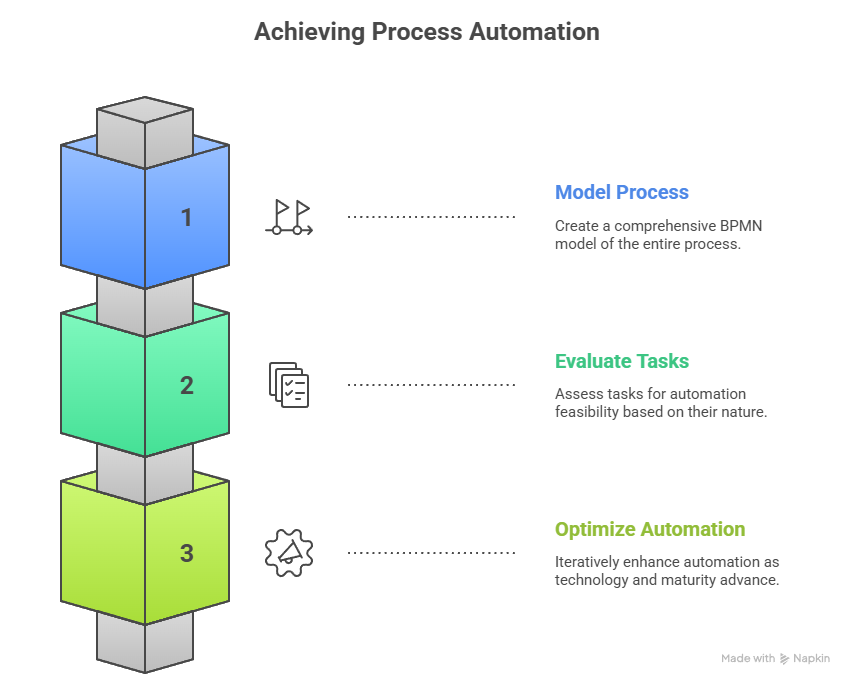
This ensures that organizations balance efficiency with quality and control, rather than attempting unrealistic “full automation.”
Benefits of BPM and Workflow Automation
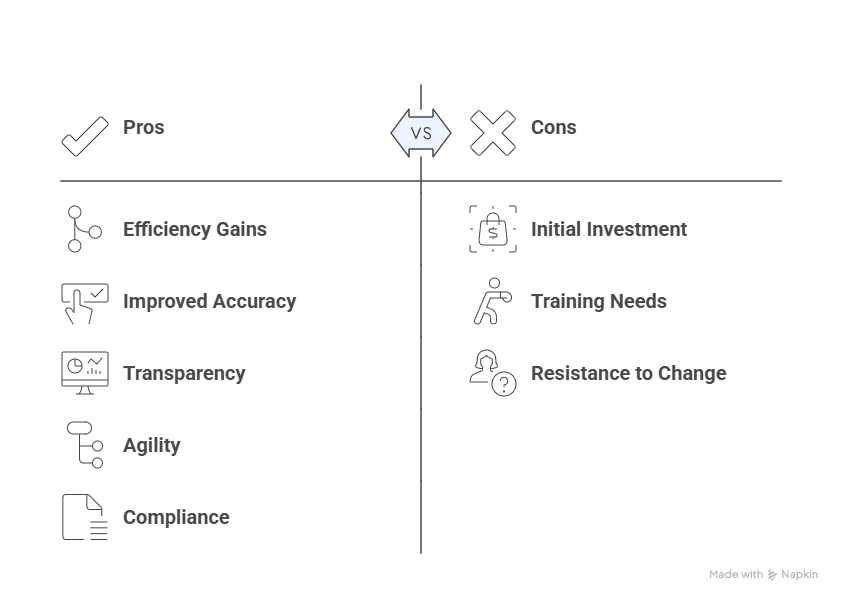
Efficiency Gains – Automating repetitive tasks reduces bottlenecks.
Improved Accuracy – Fewer errors in data entry and handoffs.
Transparency and Monitoring – Dashboards and analytics for real-time tracking.
Agility and Adaptability – Processes can be rapidly updated.
Compliance and Auditability – Automated logs and audit trails support governance.
BPM + Automation in Practice
Here’s how BPM and workflow automation work hand-in-hand:
- Design the Process – Use BPMN to map out workflows, including user tasks.
- Automate the Execution – Deploy in a workflow engine (e.g., Camunda, ProcessMaker, Nintex).
- Monitor and Optimize – Track KPIs and refine models for continuous improvement.
Example: Automated Employee Onboarding
A traditional onboarding process involves multiple departments and manual steps. With BPM and automation:
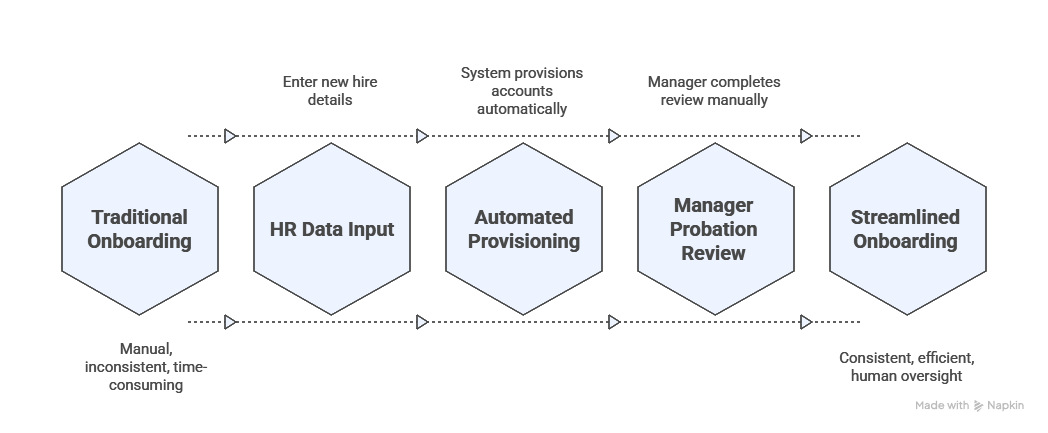
This hybrid approach reduces onboarding time, ensures consistency, and keeps humans in the loop where necessary.
- Camunda Platform – Open-source workflow and decision automation.
- ProcessMaker – BPM and automation suite for enterprises.
- Nintex – Low-code automation platform with strong integration features.
- Zapier (for smaller workflows) – Automates repetitive tasks across SaaS apps.
Conclusion
BPM provides the strategic framework for managing business processes, while workflow automation delivers operational execution. Together, they enable organizations to scale, adapt, and remain competitive in a digital-first world.
By scanning BPMN diagrams for automation opportunities and integrating human-in-the-loop tasks where judgment is required, businesses can achieve the right balance of efficiency and control.
If BPMN helps you draw the map, automation ensures you can travel the path efficiently—with humans still steering at the critical turns.
Explore more like this
![[PROJECT] Smart Inbox Automation with n8n — Auto-categorize Emails and Trigger Custom Actions](/assets/images/PRJ-n8n/cover-n8n.png)
[PROJECT] Smart Inbox Automation with n8n — Auto-categorize Emails and Trigger Custom Actions
With n8n, an open-source workflow automation tool, you can fairly easy create AI powered workflows such as an workflow that automatically categorizes incoming emails and triggers custom actions based on...
![[PROJECT] Building a Free Automated Movie and TV Show Tracking System](/assets/images/PRJ-movie-tracker-automation/cover-movie-tracker-automation-removebg-preview.png)
[PROJECT] Building a Free Automated Movie and TV Show Tracking System
This project covers the process of creating an automated system to track your movie and TV show collection using Python and free Hosting services. This system helps keep an organized...

Error Handling in n8n: Best Practices and Techniques
Automating workflows with n8n can significantly enhance productivity and streamline processes. However, as with any automation tool, errors can occur. Effective error handling is crucial to ensure that your workflows...
Comments