
Error Handling in n8n: Best Practices and Techniques

Automating workflows with n8n can significantly enhance productivity and streamline processes. However, as with any automation tool, errors can occur. Effective error handling is crucial to ensure that your workflows run smoothly and that you can quickly address any issues that arise.
Understanding Error Handling in n8n
n8n provides several built-in features to help manage errors in your workflows. These include:
- Error Trigger Node: This node can be used to catch errors from other nodes in your workflow. It allows you to define specific actions to take when an error occurs, such as sending notifications or logging the error details.
- Continue On Fail: This option can be enabled on individual nodes to allow the workflow to continue executing even if a node fails. This is useful for non-critical nodes where you want the workflow to proceed regardless of errors.
- Retry Mechanism: Some nodes have a built-in retry mechanism that can be configured to attempt the operation multiple times before failing.
Use the Error Trigger Node
Always include an Error Trigger node in your workflows to catch and handle errors effectively. This allows you to centralize error handling logic and take appropriate actions when something goes wrong.
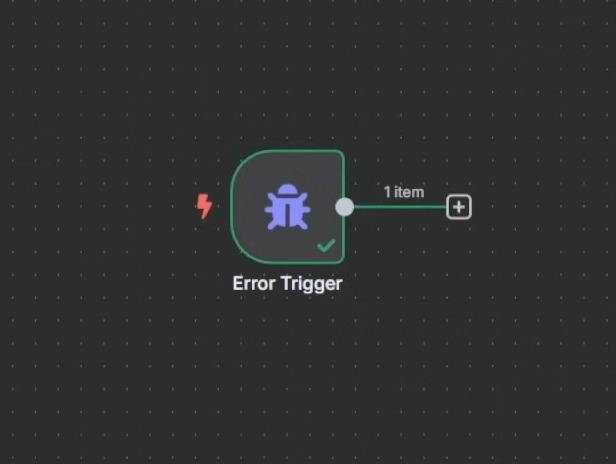
This can be extended with a function node to parse the error message and send a detailed notification via email or messaging platforms like Slack.
Don’t forget to set up the Error Workflow in the workflow settings:

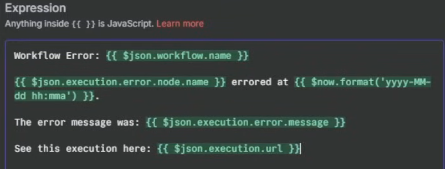
You can use built-in variables like ** to include error details in your notifications. This helps in quickly identifying and resolving issues. Following is an example of how to include the error message in a notification:
Implement Retry Logic
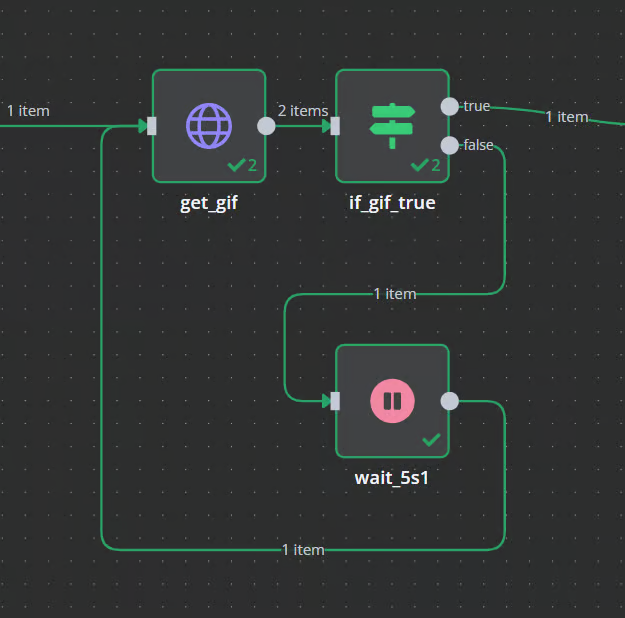
For nodes that interact with external services (like APIs), implement retry logic to handle transient errors. This can be done using the built-in retry options available in some nodes or by creating custom retry mechanisms using loops and delays.
Explore more like this
Overview of the most common nodes in n8n
n8n provides a wide range of nodes that allow you to connect different services, manipulate data, and automate workflows. Here is an overview of some of the most commonly used...
![[PROJECT] Smart Inbox Automation with n8n — Auto-categorize Emails and Trigger Custom Actions](/assets/images/PRJ-n8n/cover-n8n.png)
[PROJECT] Smart Inbox Automation with n8n — Auto-categorize Emails and Trigger Custom Actions
With n8n, an open-source workflow automation tool, you can fairly easy create AI powered workflows such as an workflow that automatically categorizes incoming emails and triggers custom actions based on...
![[PROJECT] Building a Free Automated Movie and TV Show Tracking System](/assets/images/PRJ-movie-tracker-automation/cover-movie-tracker-automation-removebg-preview.png)
[PROJECT] Building a Free Automated Movie and TV Show Tracking System
This project covers the process of creating an automated system to track your movie and TV show collection using Python and free Hosting services. This system helps keep an organized...
Comments